- Version 12.0
- Jun 11, 2026
Honista APK Download v12.0 For Android (Official)
-
4.4 12 votes
- Android 9+
- Downloads 5,000,000+





 cristiano

 leomessi

 therock


About Honista
Show your creativity to the world unlimitedly and browse with unprecedented privacy. With Honista, there are no more restrictions and no need for third-party apps to do simple tasks like downloading media and stories, hiding your appearance, Zooming Profile Picture, copying Bio, etc.
That’s because everything you need is available with one click. Whether you’re a content creator looking for tools to help you manage your account and produce more content, or a regular user looking for privacy, security, and invisibility, you’ll find all of this and more in one place “Honista App”.
We proudly present to you our genius application Honista, the best and most powerful alternative to the official application, with a truly amazing user experience. Get absolute privacy, complete customization, effective professional tools, and periodic updates. Continue scrolling down and discover more, or Download Honista Apk, the latest update, Android version, directly, and let us amaze you in our own way.
What’s New?
- Update Base to 406.0.0.58.159
- CPU Architecture: arm64-v8a.
- iOS 18.4 emojies pack.
- Bugs Fixed.
- View changelog
What is Honista App?
- Downloading media (Images, Videos, Stories)
- Unlimited privacy with Ghost mode
- Copying Bio and comments
- More features with Developer Options
Why should you use Honista?
leomessi
cristiano
therock
 tomcruise

5,000,000+
Media Downloading tools in Honista
Downloading media is not difficult with Honista, no need for third-party apps or devious methods of downloading, a simple button and one click, then the download is done directly.
We understand the importance of downloading media for our users, so at Honista we have provided a built-in button with all types of media that can be displayed in the application, such as photos, videos, stories, reels, and even voice messages. That button allows you to download all types of media directly to your phone with one click.
To download any media through the Hoinsta application, use the magic button, then the download option, which usually appears with all media, and through it, you will find the download option, or you can press the download button directly from the bottom section, and a notification will appear to you that the download has begun.
You can also browse all the content you have previously downloaded through the download history feature. Go to Settings from the toolbar at the top of the main interface in the application, and you will find the “Download History” under Options. This feature allows you to easily manage all the content you have downloaded, and you can control downloads in real time.
Exclusive Special Features for Creators
Speaking of the many features mentioned above, and that there’s no need for more third-party apps, it’s time to review the special features that the Honista app offers its users. Below, learn about the magic of Honista’s special tools.
- Special Features of Posts: A set of carefully selected features to appear with posts that can be accessed by pressing once the post’s magic button. This button contains features such as downloading, copying, and reusing the post’s contents.
- Special features for stories: The same is available for stories on Honista, where you will get the magic button with all the features in it that allow you to reuse stories, and Honista also allows you to control the playback ability of the story video and open the next story, whether on or off.
- Special features for Reels videos: Honista users usually want to download short videos “Reels”, so the same magic button has been added with special features such as downloading, showing the cover image, downloading audio only, showing the description, and other necessary features for content creators.
- Special features of the profile: There is much more than following and unfollowing in Honinsta when visiting any account, as through the magic button for special features you can find many new options, such as displaying the personal and zooming profile picture, displaying expired stories, copying the bio, modifying page information (fake), adding a note, and finally adding the account to favorites.
- Special features for conversations: Finally, you are allowed to view deleted messages from conversations in the latest version of Honista app through special features that ensure the ability to view deleted conversations and also encrypt conversations.
Remove Ads and Recommandations
After all the impressive work on exclusive features, we certainly won’t let ads affect your experience with our app. That’s why we developed the Ad Removal and Suggestions Tool, which helps you enjoy a clean browsing experience without any interruptions from ads of any kind. This is achieved through features that you can enable or disable from Honista’s settings.
- Anti Advertise: Posts and stories containing mentions from pages you have marked as ad pages will be removed. This also helps reduce data consumption.
- List of Anti-Ads pages: If you want to block ads from a specific page, you can activate this feature for that page by visiting it and selecting the “Anti Ads” feature, identified by a shield icon.
- Sponsored Ads Removal: This feature allows you to remove all sponsored ads in all forms from the app, ensuring a completely distraction-free experience. You can enable or disable it in the settings.
- Suggested Posts Removal: Using this feature, you won’t see any more suggested posts on your feed. You’ll only see posts from the accounts you follow.
Toolbar Settings and Magic Button Options
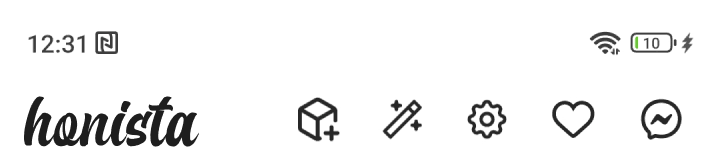
At the top of Honista’s interface lies the magic, this is where you can quickly access more than 70% of the app’s features and control them. Let us introduce you to what awaits you in this small but powerful section.
Settings button: From this button, you can directly access all the app’s settings, allowing you to customize Honista to suit your usage style.
AI Tools button: This button provides direct access to three AI tools recently integrated into Honista:
- AI chat Bot: Developed to keep up with the current AI boom, this chatbot assists you in content creation through Honista.
- Emoji Mixer: A unique tool that lets you combine two emojis to create a brand-new one.
- Background remover: A simple tool that helps you remove the background of an image and make it transparent for easy future use.
Magic button: This button is designed to offer very quick access to the most essential features that Honinst users need, allowing you to access the following:
- Dark mode: Enable or disable the night mode with this feature.
- Ghost mode: Activate or deactivate complete privacy using Ghost Mode.
- filters features: Gain full control over blocking and removing ads, pages, and suggestions in a simplified way.
- Cancel all uploads: A single button to stop all the content you’re uploading to your profile on Honista.
- Favorite pages: A list of your favorite pages that you have previously marked.
Security and Privacy
Browsing social media apps has often been frustrating due to the lack of options to hide activity or appear offline. However, with Honista, things are entirely different. Here’s what allows you to browse Honista with greater freedom and absolute privacy.
Ghost Mode: This feature is designed specifically for those seeking a usage experience with complete privacy, hiding your activity across all aspects of the app, including:
- Ghost Mode for Stories: View stories from other accounts without showing up in their view count.
- Ghost Mode for Chats: Read messages in conversations without marking them as seen, keeping your chats unread.
- Ghost Mode for Live Streams: Join live streams without anyone noticing, as the viewer count remains unchanged.
Hide the App Icon & Name: With Honista’s distinctive icon, the app might attract unwanted attention from others using your phone. That’s why we’ve provided the ability to change the app icon. You can make Honesta look like a clock or calculator app, or even make the icon completely transparent without a name.
Hide and Lock Chats: For added protection, we’ve developed a feature that lets you hide specific chats and lock them with a passcode. You can manage their visibility and ensure they remain private.
App Lock: To make privacy in Honista truly comprehensive, we’ve included the option to lock the entire app with a password or fingerprint, ensuring no one can intrude on your account.
Full Customizations (Fonts, Emoji, themes)
Now you can add your personal touch to Honista, as we provide the ability to fully and easily customize many of the main elements in the app. Here’s what you can customize in Honsta.
- Themes and interface: Choose from 30 different themes to change Honista’s default theme and make it better match your personal taste.
- Emojis: You can change the emojis used in the app to various styles from different operating systems, such as iPhone emojis, Android emojis, or Windows emojis.
- Fonts: Honista allows you to change the default fonts in the app to a variety of pre-available fonts or use a font previously downloaded to your device’s storage.
New Tools Powered by AI
As is evident, we place great emphasis on content creators in Honista. With the advancement of AI tools, we have integrated several features we believe will help you create content faster and better. Discover our new AI-powered tools, designed specifically for you.
- AI Chatbot: A tool designed primarily to assist content creators by offering the ability to write captions for posts, create engaging and creative products descriptions, respond to comments, and even suggest new ideas for your content, among other features.
- Emoji Mixer: Ever wondered how emojis would look if mixed professionally? Use the Emoji Mixer and be amazed at the quality of the results.
- Background Removal Tool: There’s no need to download additional apps for this simple task. Honista offers a built-in tool that removes backgrounds from your photos and allows you to save these images for future use.
Activity History "Keep what you watched"
With Honista, you’ll never lose any photo, story, video, or post you’ve viewed. We understand that you may come across content on Honista and want to revisit it later. That’s why we developed the Activity and Download History feature, allowing you to access all your activity on the app in an organized and simple way.
- Download History: You can access all the content you’ve downloaded from Honinsta by navigating to Settings, then Download History. Here, you’ll find everything you’ve downloaded during your time using Honista.
- Activity History: Similar to accessing Download History, you can view your Activity History, where you can revisit any content you’ve browsed before. The best part is that the history is categorized by type and supports search functionality.
Honista Secret Options (Developer Options)
To our professional users whose customization needs go beyond the options and features already provided in the app, here’s something new. With Honista secret features, users can customize every tiny detail in the app according to their needs. Not only that, but they can also access more advanced options. With Honista secret options, also known as “Developer Options,” you can enable entirely new features that were previously unavailable to anyone.
The secret options in Honista give you control over all aspects of the app, from the home screen to chats, calls, stories, and even live broadcasts. Every part of the app is deeply customizable with features beyond imagination.
Note: Using the secret options without proper knowledge may cause the app to malfunction or behave unstably. In such cases, you may need to reinstall the app.
Backup and Bugs fix
With the vast range of customization options and features provided, enabling several of them simultaneously could sometimes cause errors. This made it clear that developing a backup feature was essential. Not only did we introduce this feature, but we also developed an error repair function. Now, with Honista, you can customize and modify everything as you wish, while always having the ability to revert to the latest stable version of your configurations.
- Backup Options: With this feature, you can create or restore backups stored on your device. Backups allow you to preserve your customized settings for future use.
- Error Repair Options: This feature was developed to provide a simple solution for Honista users who encounter app instability, feature conflicts, or crashes. It is effective in most cases, but if the problem persists, reinstalling the app remains a reliable solution to overcome any issues or errors.
Honista is always updated
- Open Honista app and then go to Settings through the toolbar at the top of the interface.
- From Settings, head to the “About Honista” option.
- You will find the option “Check for a new update”, click on it.
- Wait a few moments and you will see a message that tells you whether there is a new update or not.